




Åbn tilgængelighedsmenuen Gå til sideindhold

Design your resume with 1,360+ free resume templates

Pick from 1,360+ free resume templates, add your details, and download a PDF. Or describe the resume you want and let AI design it for you

Design your resume with 1,360+ free resume templates

Pick from 1,360+ free resume templates, add your details, and download a PDF. Or describe the resume you want and let AI design it for you
Design your resume with 1,360+ free resume templates Design your resume with 1,360+ free resume templates

Lås op for smartere, AI-drevet markedsføring med PosterMyWall Premium.

Download your resume without hitting a paywall

Most resume builders let you design for free, then ask for a card at the download button. PosterMyWall does not. Pick any resume design, edit it as many times as you want, and download a clean PDF with nothing stamped across your work history. Browse %count%+ free resume templates and start with one built for your field.

Edit your resume online, no software to install

The free resume editor opens in your browser. Move a section, change the font, recolor the header, and swap your photo without touching a design app. Clean up the background behind your headshot with the AI Background Remover. Your file saves to your account, so the next version starts from the last one.

How to create resume

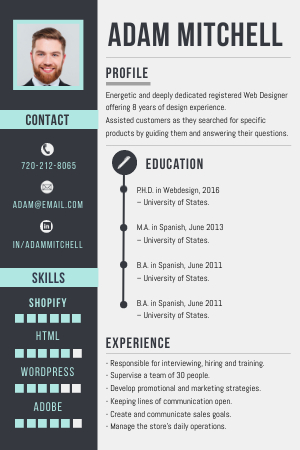
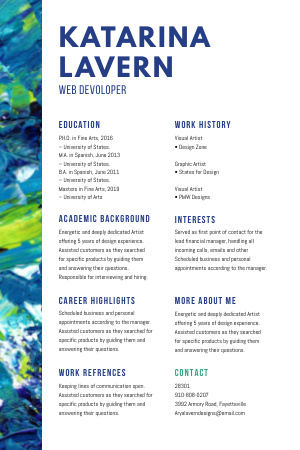
Most recruiters give a resume under a minute, so one page is usually the right length. Use a single column layout when you want a fast read, or two columns when you have more to fit. Templates cover nurses, teachers, software engineers, students with a first job, and managers with 20 years behind them. Resize the same design for a LinkedIn banner.

Share your resume with professionals everywhere

Have your career take off with a blast by sharing your resumes via PosterMyWall’s integrated email marketing tools. With features to email your resume and share it with prospective employers everywhere, you are sure to find success in a competitive job market. Transform your job search today by leveraging these powerful tools to reach recruiters directly.

Hvorfor bruge PosterMyWall

How to make a resume

  1. Get started for free

    Open PosterMyWall on your desktop, mobile, or tablet and start designing for free.

  2. Start with a prompt or a resume template

    Describe your idea and PosterMyWall AI builds the design for you; or pick from thousands of resume templates.

  3. Customise with smart tools

    Add your logo, images, videos, and audio clips. Generate visuals with AI and clean them up with AI Background Remover. Use Brand Kits to stay on-brand.

  4. Download your design

    Download for free or purchase high-res files. Upgrade to PosterMyWall Premium plans for unlimited high quality image and video downloads, plus the full AI suite.

  5. Share with your audience

    PosterMyWall is an AI-powered digital marketing platform. Publish to social, send email campaigns, create shareable calendars with the event marketing tool, and display on digital screens.

Alt-i-én, AI-drevet marketingplatform

Opret, del og spor dit indhold på ét sted

Nem markedsføring starter her

Nem markedsføring på sociale medier

  • Lav videoer til sociale medier med Tidslinje og AI-undertekster, og del dem!
  • Lav hurtigt billedtekster med vores AI-forfatter - ikke flere kreative blokeringer.
  • Publicer opslag og stories på alle sociale medier med ét klik. Din rækkevidde har aldrig været større!
  • Planlæg opslag til alle dine sociale medier på forhånd. Vi klarer resten.
  • Lav videoer med Tidslinje og AI-undertekster.
  • Lav billedtekster i en fart med vores AI-forfatter - ikke flere kreative blokeringer.
  • Udgiv indlæg og historier på alle sociale medier med et enkelt klik.
  • Planlæg opslag til alle dine sociale medier på forhånd. Så klarer vi resten.
Nem markedsføring starter her

E-mails uden html-kodning gør det nemt for brugerne

  • Vælg mellem over 3.600 professionelt designede e-mailskabeloner.
  • Tilpas med sektionsskabeloner, stilarter, flette-tags og mere.
  • Send op til 10.000 e-mails hver måned.
  • Opret tilmeldingsformularer til e-mail for at udvide dine lister.
  • Vælg mellem over 3.600 professionelt designede e-mailskabeloner.
  • Tilpas med sektionsskabeloner, stilarter, flette-tags og mere.
  • Send op til 10.000 e-mails hver måned.
  • Opret e-mail-tilmeldingsformularer for at udvide dine lister.
Nem markedsføring starter her

Design med nemme værktøjer

  • Lås op for ubegrænset download af billeder og videoer i høj opløsning
  • Lav tillokkende produktfotos med AI-baggrundsfjerner.
  • Gør din fantasi til virkelighed med AI-billeder.
  • Opnå konsekvent branding med Brand Kits.
  • Lås op for ubegrænset download af billeder og videoer i høj opløsning.
  • Lav tillokkende produktfotos med AI-baggrundsfjerner.
  • Gør din fantasi til virkelighed med AI-billeder.
  • Opnå konsekvent branding med Brand Kits og brugerdefinerede skrifttyper.
Nem markedsføring starter her

Få en strømlinet marketingplan

  • Planlæg opslag på sociale medier og e-mails til senere.
  • Planlæg kampagner i én kalender, og nå dine mål.
  • Gå aldrig glip af en marketingmulighed.
  • Planlæg opslag og e-mails til senere.
  • Planlæg kampagner i én kalender, og nå dine mål.
  • Gå aldrig glip af en marketingmulighed.
Nem markedsføring starter her

Skab opmærksomhed om din næste begivenhed

  • Tiltræk flere folk med ubegrænsede tilpassede begivenhedssider.
  • Lav spændende begivenhedsbeskrivelser med AI-forfatter.
  • Publicer din begivenhed på alle sociale medier med det samme.
  • Gør opmærksom på din begivenhed med e-mails, som er klar til afsendelse.
  • Tiltræk flere folk med ubegrænsede tilpassede begivenhedssider.
  • Lav spændende begivenhedsbeskrivelser med AI-forfatter.
  • Publicer din begivenhed på alle sociale medier med det samme.
  • Gør opmærksom på din begivenhed med e-mails, som er klar til afsendelse.
Nem markedsføring starter her

Smartere marketing med AI

Udforsk flere designskabeloner

Ofte stillede spørgsmål

Is PosterMyWall's resume builder free?

Yes, PosterMyWall's resume builder is free, and so is downloading your finished resume. The free plan covers the editor, the resume templates, and standard-quality downloads with no watermark. Premium plans add unlimited high-resolution downloads, premium templates, and the full AI suite if you want them.

What should I include in a resume?

A resume needs your contact details, a short professional summary, work history in reverse order, education, and a skills list. Add certifications, projects, or volunteer work when they back up the role. Leave out references and jobs older than about 15 years. PosterMyWall templates lay out these sections for you.

How do I create a resume on PosterMyWall?

Open the resume templates gallery, pick a design, type your details over the placeholder text, and download the file as a PDF. The editor keeps spacing, fonts, and alignment consistent while you edit. Work from a desktop, tablet, or phone, whichever is nearest.

Should my resume be one page?

A one page resume is right for most people with fewer than 10 years of experience, including students and recent graduates. Two pages are accepted at senior levels and in academia, where the extra room is expected. Cut older roles and objective statements before you shrink the font.

What resume format should I use?

Use a reverse chronological resume format, which lists your most recent job first and is what most recruiters expect to see. A functional format suits career changers with gaps, and a combination format leads with skills before roles. PosterMyWall has resume templates for all three.

Can I edit my resume online without installing anything?

Yes, PosterMyWall is a free online resume editor that runs in your browser, so there is nothing to install. Your resume saves to your account, so you can reopen it from any device and edit it later. Apps for iOS and Android work the same way.

Can AI help me write my resume?

Yes, AI Writer drafts summaries, bullet points, and skill lines for your resume, which you then edit into your own words. PosterMyWall includes eight AI tools in total, covering writing, images, backgrounds, voice, and subtitles. For a resume, AI Writer and the AI Background Remover do most of the heavy lifting.

How do I make my resume look professional?

Start from a ready resume template, which already has the spacing, hierarchy, and font pairings a designer would pick. Keep to two fonts and one accent color, leave white space around each section, and use bold only for job titles and dates. The template holds the rest together.

Can I make a different resume for each job?

Yes, save your resume to your PosterMyWall account and duplicate it for every application, then swap the summary and skills to match each job description. Tailoring a resume to the posting beats sending one generic file. Track what you sent and when with the Content Planner.


Sammenlign PosterMyWall